
Home › Forums › Fórum Detecção de Movimentos com Python e OpenCV › Linhas delimitadoras › Reply To: Linhas delimitadoras
5 de outubro de 2022 at 06:58
#37232

Isso mesmo Pedro, perfeita a sua pergunta!
Precisa ajustar esta função na classe ou criar uma nova função, segue o script:
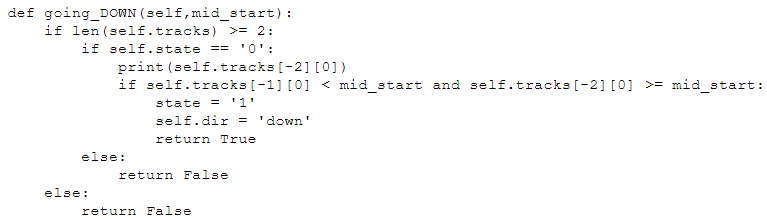
Também estou mandando abaixo o código completo com os ajustes necessários para analisar um objeto que se move na horizontal.
import numpy as np
import cv2
import Class_HORIZONTAL as Object
import time

LINE_DOWN_COLOR = (232,162,0)
BOUNDING_BOX_COLOR = (188,188,188)
TRACKER_COLOR = (255,255,255)
CENTROID_COLOR = (0, 128, 255)
LINE_LIMIT_COLOR = (0, 128, 255)
SAVE_IMAGE = True
IMAGE_DIR = "./out"
VIDEO_SOURCE = "teste.mp4"
VIDEO_OUT = "result_H.mp4"

# Limites da ROI
a1, a2 = 370, 470
l1, l2 = 750, 900
font = cv2.FONT_HERSHEY_SIMPLEX

cap = cv2.VideoCapture(VIDEO_SOURCE)
hasFrame, frame = cap.read()

fourcc = cv2.VideoWriter_fourcc(*"MP4V")
writer = cv2.VideoWriter(VIDEO_OUT, fourcc, 25, (frame.shape[1], frame.shape[0]), True)

# Exibir as propriedades do vídeo de entrada
for i in range(19):
    print(i, cap.get(i))

h = a2
w = l2
frameArea = h*w
areaTH = frameArea/250
print('Area Threshold', areaTH)

# Linhas de entrada/saída
line_down = int(1*(w/8))
in_down = int(l2)

down_limit = int(l1+50)

print("Blue line x:", str(line_down))
pt1 = [in_down, a1]
pt2 = [in_down, a2]
pts_L1 = np.array([pt1, pt2], np.int32)
pts_L1 = pts_L1.reshape((-1, 1, 2))

pt7 = [down_limit, a1]
pt8 = [down_limit, a2]
pts_L4 = np.array([pt7, pt8], np.int32)
pts_L4 = pts_L4.reshape((-1, 1, 2))

# Background Subtractor
fgbg = cv2.createBackgroundSubtractorMOG2(detectShadows=False)

# Filtros morfológicos
kernel = cv2.getStructuringElement(cv2.MORPH_ELLIPSE, (2, 2))
kernelOp = np.ones((3, 3), np.uint8)
kernelOp2 = np.ones((5, 5), np.uint8)
kernelCl = np.ones((11, 11), np.uint8)

def save_frame(frame, file_name, flip=True):
    # flip BGR to RGB
    if flip:
        cv2.imwrite(file_name, np.flip(frame, 2))
    else:
        cv2.imwrite(file_name, frame)

def main():
    # # Variáveis
    cnt_down = 0
    Objects = []
    max_p_age = 5
    pid = 1
    frame_number = -1
    while(cap.isOpened()):

        ret, frame = cap.read()
        roi = frame[a1:a2, l1:l2]
        cv2.rectangle(frame, (l1, a1), (l2, a2), BOUNDING_BOX_COLOR, 1)

        frame_number += 1

        for i in Objects:
            i.age_one()  # marcar cada detecção como um objeto
        #########################
        #   Estágio de pré-processamento  #
        #########################

        # Aplica bgs
        fgmask = fgbg.apply(roi)
        fgmask2 = fgbg.apply(roi)

        # Usando o método de binarização para remover sombras
        try:
            ret, imBin = cv2.threshold(fgmask, 200, 255, cv2.THRESH_BINARY)
            ret, imBin2 = cv2.threshold(fgmask2, 200, 255, cv2.THRESH_BINARY)

            # Opening (erode->dilate)
            mask = cv2.morphologyEx(imBin, cv2.MORPH_OPEN, kernelOp)
            mask2 = cv2.morphologyEx(imBin2, cv2.MORPH_OPEN, kernelOp)
            # Closing (dilate -> erode)
            mask = cv2.morphologyEx(mask, cv2.MORPH_CLOSE, kernelCl)
            mask2 = cv2.morphologyEx(mask2, cv2.MORPH_CLOSE, kernelCl)

            mask = cv2.dilate(mask, kernel, iterations=2)
            mask2 = cv2.dilate(mask2, kernel, iterations=2)
        except:
            print('OBJECT:', cnt_down)
            break

        (img, contours0, hierarchy) = cv2.findContours(
            mask2, cv2.RETR_EXTERNAL, cv2.CHAIN_APPROX_SIMPLE)
        for cnt in contours0:
            area = cv2.contourArea(cnt)
            if area > areaTH:

                M = cv2.moments(cnt)
                cx = int(M['m10']/M['m00'])
                cy = int(M['m01']/M['m00'])
                x, y, w, h = cv2.boundingRect(cnt)

                new = True
                if cx in range(down_limit):
                    for i in Objects:
                        if abs(x-i.getX()) <= w and abs(y-i.getY()) <= h:
                            new = False
                            i.updateCoords(cx, cy)
                            if i.going_DOWN(line_down) == True:
                                cnt_down += 1
                                if SAVE_IMAGE:
                                    save_frame(roi, IMAGE_DIR + "/mask_%04d.png" % frame_number, flip=False)
                                print("ID:", i.getId(),'crossed going down at', time.strftime("%c"))
                            break
                        if i.getState() == '1':
                            if i.getDir() == 'down' and i.getX() < down_limit:
                                i.setDone()
                        if i.timedOut():
                            index = Objects.index(i)
                            Objects.pop(index)
                            del i
                    if new == True:
                        p = Object.MyObject(pid, cx, cy, max_p_age)
                        Objects.append(p)
                        pid += 1

                cv2.circle(roi, (cx, cy), 5, CENTROID_COLOR, -1)
                img = cv2.rectangle(roi, (x, y), (x+w, y+h), TRACKER_COLOR, 2)

        for i in Objects:
            cv2.putText(roi, str(i.getId()), (i.getX(), i.getY()),
                       font, 0.3, i.getRGB(), 1, cv2.LINE_AA)

        str_down = 'OBJECTS: ' + str(cnt_down)
        frame = cv2.polylines(frame, [pts_L1], False, LINE_DOWN_COLOR, thickness=2)
        frame = cv2.polylines(frame, [pts_L4], False, LINE_LIMIT_COLOR, thickness=2)
        cv2.putText(frame, str_down, (10, 50), font,
                   1, (255, 255, 255), 3, cv2.LINE_AA)
        cv2.putText(frame, str_down, (10, 50), font, 1, (232,162,0), 2, cv2.LINE_AA)

        cv2.imshow('Frame', frame)
        # cv2.imshow('Mask', mask)

        writer.write(frame)

        k = cv2.waitKey(30) & 0xff
        if k == 27:
            break

    writer.release()
    cap.release()
    cv2.destroyAllWindows()

main()
-
This reply was modified 4 years ago by
Dalton Vargas.
-
This reply was modified 4 years ago by
-
This reply was modified 4 years ago by